Perspective · Learning lab
From manual uploads to CI/CD
This site is my learning lab. I am here to learn how it works by doing something real. This discussion is about what changed in the way I publish it.
Where I started
Until recently, every change meant uploading the whole site by hand. I kept one folder per version on my drive, zipped the latest one, and sent it to Cloudflare. I was repeating this step even when I had changed a small sentence.
It worked, but of course I was not bringing updates frequently and I was not controlling errors or a list of current changes implemented. The only record of what had changed was my memory and a list of notes, and the only test was opening the page afterwards and looking at it.
How it works now
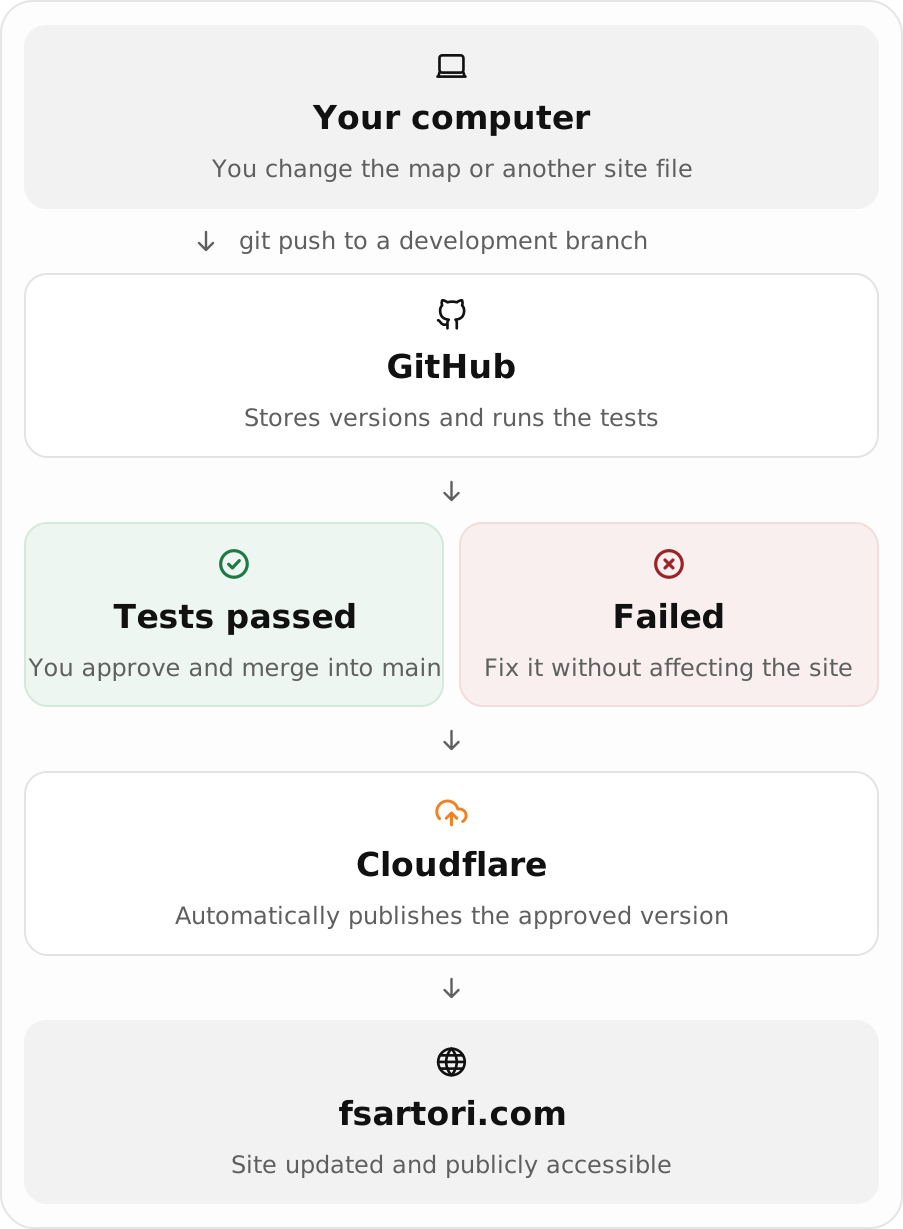
Now, the site lives in a Git repository on GitHub. I make small changes on a separate branch and
open a pull request, and GitHub runs the tests on it. The public version only changes when
I merge into main, after every check has passed. Cloudflare takes it from there.
A real example: updating the maps
My Two runoffs post links to two interactive maps, and I had a new final version of them. In the old routine that meant a new folder, a new zip and a full upload. This time the whole change was two files:
public/perspective/brazil-runoffs/maps/mapa_eleicao_2022.html
public/perspective/brazil-runoffs/maps/mapa_eleicao_2026.html
The maps come out of a script, and the new files did not include the Cloudflare Web Analytics snippet. I knew that and I had written a check for this case. I wanted to know whether it would flag the error.
It did. Here is the relevant part of the log:
FAIL .../maps/mapa_eleicao_2022.html: Web Analytics script present exactly once  ->  found 0, fsartori.com token missing
FAIL .../maps/mapa_eleicao_2026.html: Web Analytics script present exactly once  ->  found 0, fsartori.com token missing

28 checks passed, 2 failed.
I added the snippet to both files and pushed again to the same branch. The tests ran again on their own and passed, and only then did I merge. This is the whole sequence:
| Time | What happened |
|---|---|
| 10:08 | Committed the two new map files on a branch |
| 10:12 | Opened the pull request, which started the tests |
| 10:13 | The static checks failed: 28 passed, 2 failed. The live site still had the old maps |
| 10:27 | Pushed the fix to the same branch |
| 10:28 | The tests ran again and passed |
| 10:36 | Merged into main, and Cloudflare published the new version |
Why this check exists
I use Cloudflare Web Analytics to see how many people visit the site and which pages they open. When I moved the site from Cloudflare Pages to Workers, the snippet that Cloudflare used to add automatically disappeared after a deploy. So it now lives in the HTML of every page, and a test requires it exactly once per page.
This kind of mistake is easy to miss. Without the snippet the maps look perfect and no error appears anywhere. I would only have noticed later, as a gap in the numbers.
On every pull request, my tests check that:
- no sensitive or development files are in the published folder, and no file exceeds the host's size limit;
- security headers are in place, and the analytics snippet appears once per page;
- local links and images exist, external resources use https, and the JavaScript has no syntax errors.
Analytics. The snippet sends page views and performance metrics to Cloudflare Web Analytics, which only I read, through my account. Cloudflare states that the product uses no cookies or localStorage and does not fingerprint visitors.
Stack. Static HTML and CSS, Git and GitHub, GitHub Actions for the tests (Python, Playwright), Cloudflare Workers Builds for publishing.